Workflow Health
Workflow Health is a tenant-wide dashboard that shows, at a glance, how every project’s design workflow is doing right now — which jobs are running or have failed, how far each project’s design streams have got, and any anomalies Workbench has detected. Open it from Workflow Health in the left menu. It is read-only and refreshes on its own every 15 seconds.
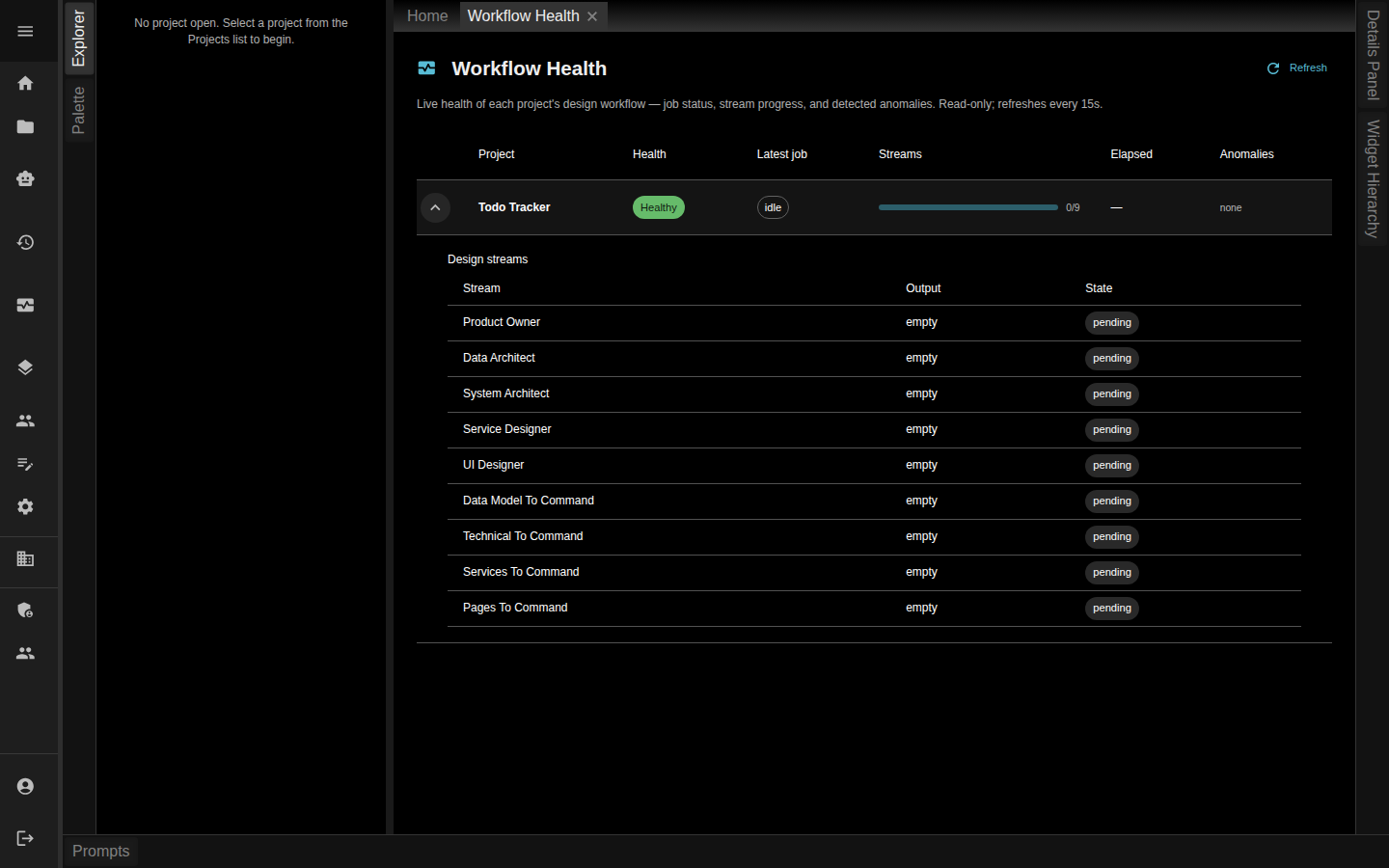
The dashboard
Across the top, a Refresh button forces an immediate reload, and summary chips call out how many projects are critical or in warning so a problem doesn’t hide in a long list. Below that is one row per project with these columns:
| Column | What it tells you |
|---|---|
| Project | The project the row is about |
| Health | An overall verdict — Healthy, Info, Warning, or Critical |
| Latest job | The status of the project’s most recent Brain Chain job (for example running or failed), with the job type beside it |
| Streams | A progress bar and an N/M count of how many design streams have produced output |
| Elapsed | How long the latest job has been running |
| Anomalies | A count of detected issues, or none |
When the tenant has no workflow activity yet, the page simply says so rather than showing an empty grid.
Digging into a project
Any row with detail to show has an expand control on its left. Open it and Workbench shows two things:
- Anomalies — each detected problem as a colour-coded alert: its type, the design stream it relates to, and the evidence behind it, tinted by severity so the worst ones stand out.
- Design streams — a sub-table of the project’s streams with three columns:
- Stream — the stream’s title.
- Output — how much output it has produced (a character count, or empty).
- State — done, pending, or stale. A stale stream carries a tooltip explaining why its output no longer matches the design it came from.
Reading a project’s anomalies and stream states together tells you whether a build is progressing, waiting on you, or stuck.
How it relates to the rest of the workflow
Workflow Health watches the same design streams and Brain Chain jobs you drive from a project, from a bird’s-eye view. Where the Codegen Work queue answers “what needs me?” for the autoloop, Workflow Health answers “is every project’s design healthy?” across the whole tenant.
Related pages
- BrainChain — the jobs whose status this dashboard reports
- Design Streams & Version Control — the streams whose state it tracks